Claude memory: what it keeps, and how to keep clients apart
Updated
Claude memory saves what Claude learns about you as you chat, as a list of topics: your role, the people in your work, your projects and how you like to work. It is on by default on the Free, Pro and Max plans. On Team and Enterprise, an owner turns it on for the organization, and each member then turns it on for themselves. You read, edit and delete it in Settings > Your Claude, under Manage next to Your memory. Each project keeps its own memory, and by default that mixes with your account memory. If you work with several clients, turn off Use account memory in each client's project. For a single chat that should add nothing to memory, turn Memory off in the + menu before your first message, or open an incognito chat.
What Claude memory saves, and what it leaves out
Claude saves memory as a set of topics while you chat. It saves on its own, and you can also tell it to "remember this" (Claude Help Center). Anthropic's list of what it keeps covers your role and professional context, the people and places in your work, how you like to communicate and work, and the details of your ongoing projects.
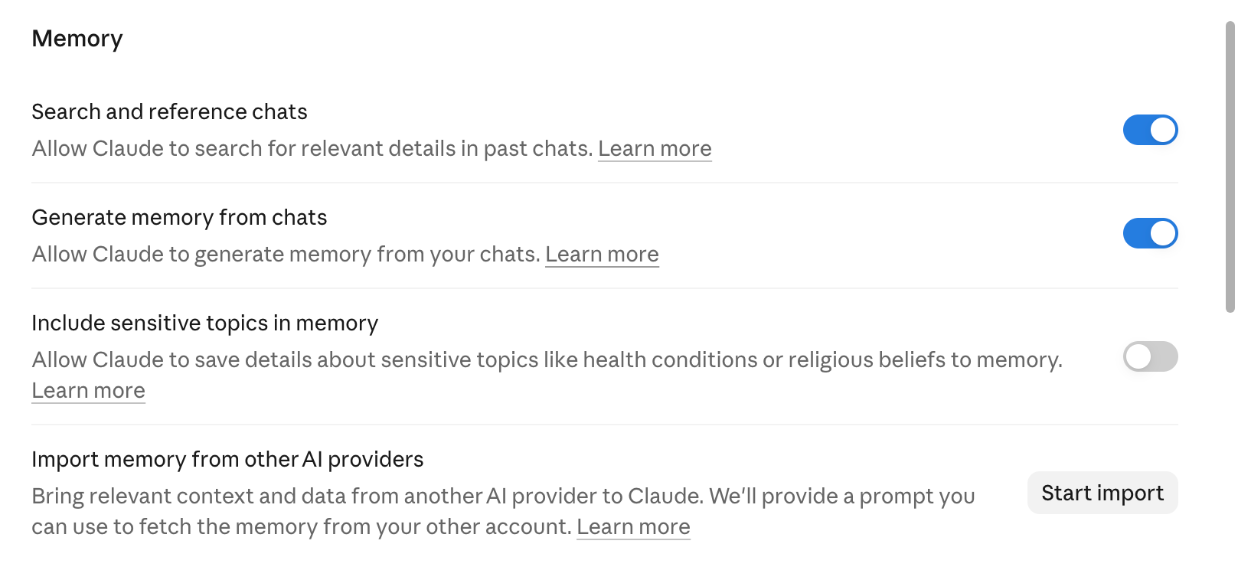
Sensitive topics stay out by default. That covers things like your health or politics. You can let them in with Include sensitive topics in memory, in Settings > Your Claude. Some things are never saved, even if you ask. Anthropic names government ID numbers, criminal history, financial account numbers and immigration status (Claude Help Center).
Memory has a neighbor called chat search. On Pro, Max, Team and Enterprise, Claude can search your past chats, and the search shows in your chat as a tool call. Inside a project, it only searches that project's chats. The switch is Search and reference chats, in Settings > Your Claude (Claude Help Center).
Turn it on, pause it or reset it
On Free, Pro and Max, memory is on unless you switched it off. The switch is Memory from chats in Settings > Your Claude. In the older settings layout it lives in Settings > Memory and is called Generate memory from chats (Claude Help Center).
On Team and Enterprise, an Owner or Primary Owner turns memory on in Organization settings > Capabilities. It then stays off for each member until that member turns it on. Owners can't view or edit anyone's memories. If an owner turns memory off for the whole organization, every member's memories are deleted at once (Claude Help Center).
Switching your own memory off gives you two choices. Pause memory keeps what Claude saved, and Claude stops using it or adding to it. Reset memory deletes all of it, project memories included, and it can't be undone (Claude Help Center). Try Pause first.
Memory also carries into Claude Cowork when Cowork runs in the cloud. Cowork sessions that run on your own computer don't use it (Claude Help Center).
A small number of Team and Enterprise organizations still run Anthropic's older memory. You have it if memory sits under Settings > Capabilities, or if the updated Settings layout shows a setting called Generate memory from chat history. That version builds a summary that updates every 24 hours, and some rules on this page work differently there (Claude Help Center).
See, edit and delete what it remembers
Go to Settings > Your Claude and select Manage next to Your memory. Everything Claude remembers is listed under Topics. Open a topic to read it. The edit icon changes it, and Delete removes it. You can also tell Claude in any chat what to remember, change or forget, and the change applies from your next conversation (Claude Help Center).
Deleting a chat leaves its memories behind. Anthropic says memory entries made from a deleted conversation aren't removed, and you delete them one at a time in Topics (Claude Help Center). On the older memory, deleted chats drop out of the summary. This is one place where the two versions disagree, so check which one you have before you rely on either.
To keep a copy, ask Claude in a chat to "Write out your memories of me verbatim, exactly as they appear in your memory," then save the answer in a file. To bring memory over from another AI tool, select Start import in Settings > Your Claude, paste what the other tool gives you, and select Add to memory. Imports work on every plan, on the web and in Claude Desktop. Anthropic calls them experimental and says Claude may not always take in what you paste (import and export guide).
How memory works inside projects
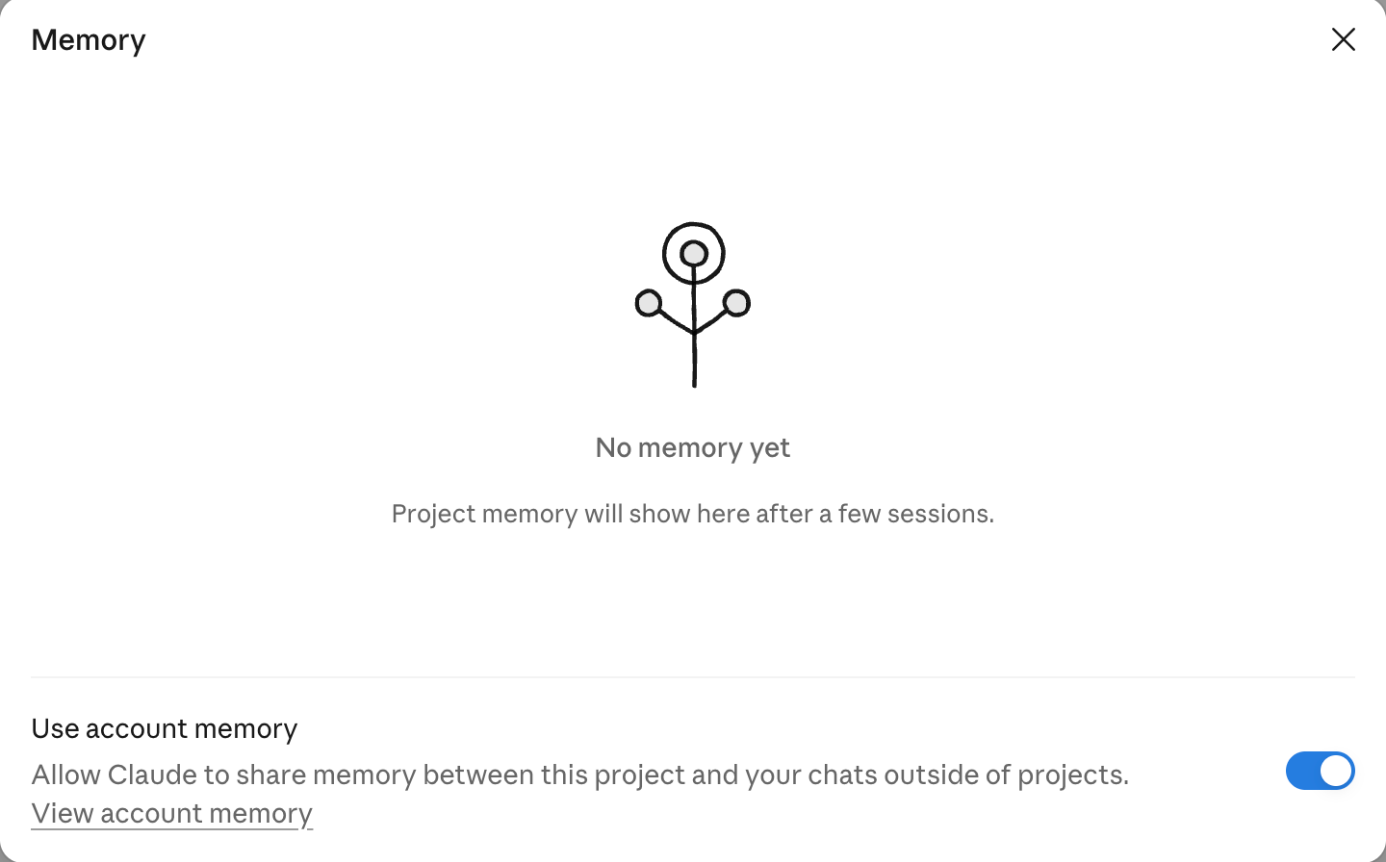
Each project has its own memory. In a project, Claude uses that project's memory plus your account memory, and leaves other projects out. What it learns in the project is saved to the project, and with memory on, Claude can also use it in chats outside projects (Claude Help Center). With one project per client, that last part is the one to watch. A detail from one client's project can come up in a general chat.
Anthropic's answer is the Use account memory switch, under Memory on the project's page. Turn it off and, in Anthropic's words, the project's memory stays fully separate. Deleting a project deletes its memory too (Claude Help Center).
Anthropic's projects article also says context is not shared across chats in a project unless you add it to the project knowledge (projects article). The memory section of the same article says each project has its own memory (projects article). The two notes read differently, so put anything Claude must know in every chat for that client into the project knowledge. That holds under either reading.
Incognito chat or memory off for one chat
Both keep one conversation out of memory. What differs is what is left afterwards.
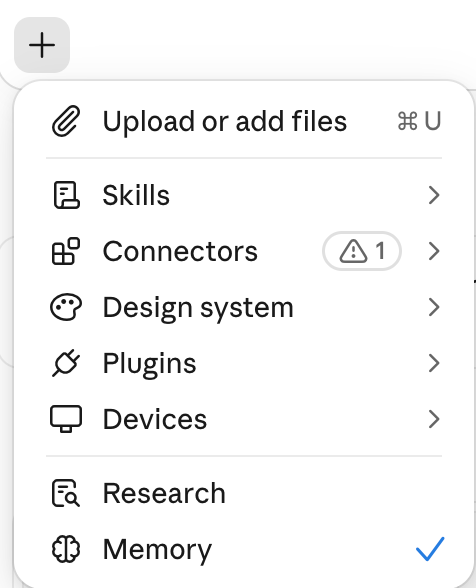
- Memory off for one chat. Start a new chat, select + in the message box, turn Memory off, then send your first message. You can't change it once the chat starts. The chat stays in your history, and your other chats can still find it through chat search. It works inside projects too, where it also skips the project's memory. It is on the web, Claude Desktop and the latest Claude Mobile (Claude Help Center).
- Incognito chat. Select the ghost icon at the top right of a new chat. It works on every plan, outside projects only. The chat isn't saved to your history or to memory, and Anthropic doesn't use it for training. Once you close it, it's gone for you, but Anthropic keeps it for 30 days by default, and on Team and Enterprise it is in the data exports owners can run. If you have the new Claude experience, Claude can't create files or run code in an incognito chat. It can still see your profile preferences and custom styles, so keep client names out of those settings (incognito guide).
A memory routine for several clients
In my workshops I build one or two skills on the client's own Claude account. For anyone who works across more than one client, this is the memory routine I'd add. Copy it into your notes, do the setup once, and run the monthly check on the first working day of each month.
Fill in the log at the bottom each time. If you deleted a topic, write which one.
CLAUDE MEMORY ROUTINE: SEVERAL CLIENTS
Date set up:

SET UP ONCE
[ ] Compliance: my plan and each client agreement
    allow client data in Claude
[ ] Settings > Your Claude: Memory from chats is on
    (older layout: Settings > Memory > Generate memory from chats)
[ ] Include sensitive topics in memory: off
[ ] Search and reference chats: decide on or off, write it down
[ ] Team or Enterprise: owner has memory on in
    Organization settings > Capabilities
[ ] One project per client
[ ] Each client project: Memory > Use account memory is off
[ ] Profile preferences and styles: no client names or details

EVERY DAY
- Client work: inside that client's project
- Quick client question outside a project:
  new chat, + menu, Memory off, then type
  (it still shows in chat search if that is on)
- Nothing should be kept: incognito chat
  (ghost icon, outside projects only)
- A fact Claude should keep: "remember this", in the right project
- A fact Claude should drop: tell it to forget, then check Manage

ONCE A MONTH
[ ] Settings > Your Claude > Manage next to Your memory
[ ] Read every topic under Topics
[ ] A client named in account memory? Edit or Delete that topic
[ ] A fact out of date (role, deadline, contact)? Edit it
[ ] Deleted client chats this month? Their memories stay.
    Find those topics and delete them
[ ] Each active client project: Use account memory still off?
[ ] Engagement over: delete the project once you no longer need it
    (its memory is deleted with it)
[ ] Backup: ask Claude "Write out your memories of me verbatim,
    exactly as they appear in your memory." Save it with the date

LOG
Date checked:
Topics edited:
Topics deleted:
Projects checked:
What memory won't do
Keeping clients apart is still your job. Until you turn off Use account memory, a project's memory and your account memory mix, as above.
Memory isn't a client file. It holds the topics Claude chose to save, and you can delete any of them. Keep your real records where you keep them today.
A process needs a different home. A task you want done the same way every time belongs in a Claude skill, and your writing voice belongs in a voice file, as in the email assistant guide.
Whether a client's data belongs in Claude at all is a separate question. It depends on your plan and your agreements with that client, and it is a question for whoever handles compliance in your firm.
This page covers the Claude apps only. Claude Code works differently. Each session starts fresh, and knowledge carries over through CLAUDE.md files you write and auto memory notes Claude writes itself (Claude Code docs).
Questions
Does deleting a chat delete what Claude remembered from it?
Not on the current memory. Entries made from a deleted chat stay until you delete them under Topics in Settings > Your Claude > Manage. On the older memory that some Team and Enterprise organizations still use, deleted chats drop out of the summary.
Can the owner of our Team plan read my Claude memory?
No. Anthropic says owners can't view or edit a member's individual memories. Owners can export incognito chats through organizational data exports, and if an owner turns memory off for the organization, everyone's memories are deleted.
Is Claude memory on the free plan?
Yes. It is on by default on Free, Pro and Max, on the web, Claude Desktop and Claude Mobile. Searching past chats needs a paid plan.
What will Claude never save to memory?
Government ID numbers, criminal history, financial account numbers and immigration status, even if you ask. Health, politics and other sensitive topics stay out unless you turn on Include sensitive topics in memory.
Can I use an incognito chat inside a project?
No. Incognito only works outside projects. Inside a project, select + and turn Memory off before your first message. That chat skips both your memory and the project's memory.
Sources
- Anthropic: Use Claude's chat search and memory to build on previous context checked 2026-10-26
- Anthropic: Use incognito chats checked 2026-10-26
- Anthropic: Import and export your memory from Claude checked 2026-10-26
- Anthropic: How can I create and manage projects? checked 2026-10-26
- Anthropic: How Claude remembers your project (Claude Code docs) checked 2026-10-26
Want Claude set up client by client?
Start with the free Executive Assistant Kit: a Claude plugin for your inbox, meetings and follow-ups.
Get The Free KitRather talk first? Book a free 20 minute fit call and bring the list of clients you work across in Claude. If the settings on this page are all your setup needs, I will say so. Pick a time